
How to Recognize Phishing Emails and Prevent Business Fraud
Phishing emails and business email fraud are becoming more sophisticated, putting businesses of all sizes at risk. Cybercriminals use fraudulent emails to steal sensitive information, redirect payments, install malware, and gain access to company accounts. Learning how to recognize phishing emails is one of the most effective ways to protect your business from financial loss and cybersecurity threats.
Fraudsters often disguise themselves as trusted vendors, financial institutions, or even internal employees to make scam emails appear legitimate. Understanding the warning signs of fraudulent emails can help your business avoid costly mistakes and strengthen overall email security.
Watch for Urgent Requests and Unusual Payment Demands
One of the most common signs of a phishing scam is urgency. Fraudulent emails often pressure recipients to “act immediately,” especially when the request involves wire transfers, payment approvals, login credentials, or confidential information.
Scammers rely on panic and quick reactions to bypass normal verification procedures. If an email requests sensitive information such as account numbers, passwords, verification codes, or banking details, stop and verify the request before taking action.
Remember: legitimate financial institutions will never ask for passwords or secure login credentials through email.
How to Verify Suspicious Email Senders
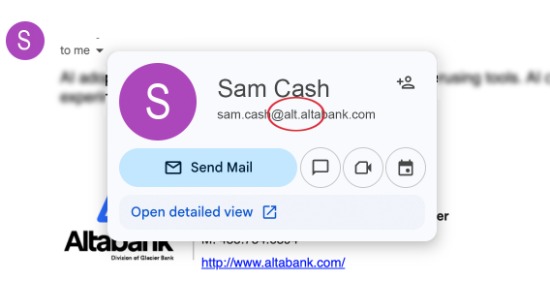
Business email fraud frequently involves spoofed email addresses that closely resemble legitimate domains. At first glance, these fraudulent email addresses may appear authentic, but small changes such as missing letters, extra characters, or altered domain names are common warning signs.
Always inspect the sender’s full email address, not just the display name. Even emails that appear to come from executives, coworkers, or trusted vendors can be spoofed.
If something feels suspicious, avoid replying directly to the email. Instead, contact the individual or organization using a verified phone number or trusted contact method to confirm the request.
If something feels suspicious, avoid replying directly to the email. Instead, contact the individual or organization using a verified phone number or trusted contact method to confirm the request.
Be Careful with Links and Email Attachments
Phishing emails often contain malicious links that direct users to fake websites designed to steal usernames, passwords, or financial information. Before clicking a link, hover over it to preview the destination URL and confirm it matches the legitimate website.
If the link looks suspicious or unfamiliar, do not click it.
The same caution applies to email attachments. Unexpected files from unknown senders may contain malware, ransomware, or viruses that can compromise your business systems.
A simple rule can help reduce risk: if you were not expecting the email or attachment, verify it first.
A simple rule can help reduce risk: if you were not expecting the email or attachment, verify it first.
Common Phishing Email Warning Signs
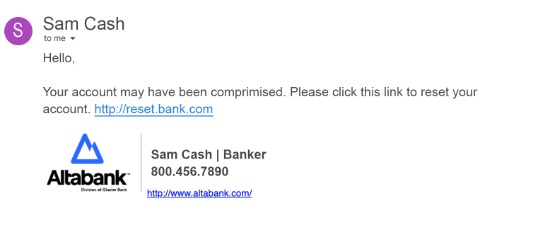
Many scam emails share similar characteristics. Watch for these common phishing email warning signs:
• Misspellings, grammatical errors, or unusual formatting
• Generic greetings instead of personalized messages
• Requests for confidential financial or login information
• Suspicious links or slightly altered URLs
• Unusual payment requests or changes to banking instructions
• Unexpected attachments or invoices
• Emails creating pressure to act quickly
While one issue alone may not confirm fraud, multiple warning signs together should raise concern.
Business Email Fraud Prevention Best Practices
Recognizing phishing emails is only one part of a strong fraud prevention strategy. Businesses should also implement internal controls and cybersecurity safeguards to reduce risk.
Important business email security measures include:
• Multi-factor authentication (MFA or 2FA)
• Employee cybersecurity training
• Secure payment approval procedures
• Fraud monitoring systems
• Spam and email filtering tools
• Positive Pay services for payment verification
Positive Pay services offered by Altabank can help businesses detect unauthorized transactions early and reduce the risk of payment fraud.
Strong internal controls help businesses prevent wire fraud, protect sensitive information, and respond quickly to suspicious activity.
What to Do If You Suspect a Fraudulent Email
If you believe you received a phishing email or clicked a suspicious link:
- Do not respond to the email
- Avoid downloading attachments
- Disconnect affected devices from your network if necessary
- Change compromised passwords immediately
- Notify your IT department or cybersecurity provider
- Contact your financial institution if sentitive financial information was shared
Quick action can help minimize damage and prevent additional unauthorized activity.
Protect Your Business from Email Fraud
Email fraud and phishing scams continue to evolve, but awareness remains one of the strongest defenses. By slowing down, verifying suspicious requests, and implementing strong cybersecurity controls, businesses can significantly reduce the risk of financial fraud and data breaches.
If you suspect fraudulent activity or want to strengthen your fraud prevention strategy, contact your local Altabank branch. Our team is here to help protect your business with tools, guidance, and fraud prevention solutions designed to keep your accounts secure.
Frequently Asked Questions About Phishing Emails
What is a phishing email?
A phishing email is a fraudulent message designed to trick recipients into sharing sensitive information, clicking malicious links, or downloading malware.
How can businesses prevent email fraud?
Businesses can reduce email fraud risk by using multi-factor authentication, employee training, payment verification procedures, and email security tools.
What are common signs of a phishing scam?
Common warning signs include urgent requests, suspicious links, misspellings, spoofed email addresses, and requests for confidential information.
What should I do if I click a suspicious email link?
Immediately stop using the affected device, notify your IT department, change passwords, and monitor accounts for suspicious activity.
ABOUT THE AUTHOR
Kinsey Love is the Digital Marketing Manager at Altabank. She specializes in content creation and strategy and enjoys all activities you can do in the mountains.